May 23, 2013

How to Embed and Play a YouTube video on a WordPress Web Page or Post Using Embed Code

This is a short description and demonstration of how to embed a YouTube video on a WordPress web page or post using embed code.


Step 1. Locate the video on line or copy the URL provided to you.

Step 2. If you have a URL Address, paste it into your browser and touch enter or click go .

Step 3. Click on the share button at the bottom of the video.

Step 4. Click on the Embed button, select the size video you want to play and copy the “embed” code..

Step 5. Open the program you want to play the video in. In the case we will demonstrate a WordPress page…

Step 6. Open the page or post where you want the video to to play . Note: Make Sure to switch to Text tab in the page editor. Paste the embed code….

Step 7. Save the page or post.

Step 8. Test the page to make sure it plays properly…

All Done…

Now you can send your customers, members or prospects a link to your web site post or page rather than YouTube. This will give you the ability to change the video that is playing if neccessary without interfering with or changing  your marketing material or emails.

Internet Video Marketing Process

Tampa Internet marketing

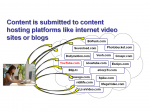
Because of the high competition in today’s market, all corporate marketing efforts need to include an internet video marketing strategy . Here is how the basic process works…

Internet Video Marketing Process Step 1.

Determine the target keyword phrase to be ranked and create the content in a video or transition video with a clear call to action on the final screen.
Tampa Internet Marketing

Internet Video Marketing Process Step 2.

As video content aggregators post the video content links start to point back to the website.
Tampa internet marketing strategyInternet Video Marketing Process Step 3.

The net result is that Google “sees” or monitors the increased “relevant” content as well as the increases consumer click-thoughs to the content on the business website.

Tampa internet marketing strategies

It is very important to note that the content needs to be relevant and valuable to consumers in order for this marketing process to work. It is not a scam or a gimmick, but a legitimate benefit to consumers in the form of educational video content.

Panoramic Demonstration Post


Tampa Internet SEO Friendly Online Magazine Website Themes

Custom Online Magazine Theme

The SEO friendly Online Magazine theme is designed to showcase video and media content. Whether you’re promoting your videos, or focusing on article content this is a great online layout theme.
View More

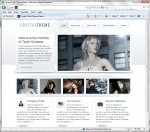
SEO Friendly Fasion Layout Designed to Showcase Fashion or Hairstyles
Custom Crystal Style SEO Friendly Theme

The SEO friendly fashion layout is designed to showcase fashion or hairstyles and content. Whether you’re documenting your hairstyle, or focusing your fashion expertise, there is no limit.
View Theme

Video Discussion Google+ Update: Real-time Search & Improved Hashtag Support

This week Google built real-time search results into Google+ to give users the ability to watch live feeds of Google+ activity about a given subject.

Google also integrated real-time search with hashtags, popularized like Twitter in order to flag themes.  Your can watch Google’s Gundotra video explaining the features in this via a YouTube video


Professional Examples of the new FaceBook “Subscribe”
Face Book Subscribe

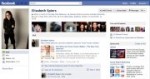
With the launch of Subscribe last week from Facebook, we wanted to show an example of some journalists who are using Subscribe to enable readers and viewers to keep up with their public updates and also subscribe to sources they are interested in keeping up with.

This is a sample in no particular order, and we’d encourage you to share the link to your profile with Subscribe in the comments below. For more on how to use Subscribe as a journalist, see our “Subscribe for Journalists” guide. And if you’re a journalist who has implemented Subscribe, please visit this gallery on how you can optimize your profile for subscribers.

To turn on Subscribe, go to https://www.facebook.com/about/subscribe.


  1. Ann Curry, TODAY Show/NBC News
  2. Brian Stelter, reporter at The New York Times
  3. Ayman Mohyeldin, NBC News, Egypt Correspondent
  4. Elizabeth Spiers, editor of The New York Observer
  5. Brian Storm, executive producer at MediaStorm
  6. Craig Kanalley, Huffington Post, senior traffic and trends editor
  7. Esther Vargas, editor at Peru21
  8. Pete Cashmore, CEO and founder of Mashable, CNN columnist
  9. Anthony De Rosa, Social Media Editor at Reuters
  10. Saul Hansell, Big News Editor at Huffington Post.
  11. Liz Gannes, AllThingsD reporter
  12. Jose Antonio Vargas, Pulitzer-prize winning journalist
  13. Robert Scoble, Scobleizer
  14. Nick Bilton, The New York Times reporter and lead technology writer
  15. Nick Denton, founder of Gawker Media
  16. Jenna Wortham, New York Times reporter
  17. Franz Strasser, video journalist at BBC News
  18. Om Malik, founder of GigaOmniMedia
  19. Jessica Vascellaro, Wall Street Journal repoter
  20. Jeff Jarvis, CUNY prof, writer
  21. Mathew Ingram, GigaOm writer
  22. MG Siegler, writer at TechCrunch
  23. Ben Parr, Editor at Large at Mashable
  24. Bilal Randere, Online Producer at Al Jazeera
  25. Laurie Segall, CNN Money producer
  26. Daniela Capistrano, Online Producer at “Countdown with Keith Olbermann”
  27. Mark Milian, reporter at CNN.com
  28. Jason Kincaid, TechCrunch
  29. Brian Ries, The Daily Beast social media editor
  30. Jenn Van Grove, senior reporter at Mashable
  31. Liz Heron, The New York Times, social media editor
  32. Jason DeRusha, WCCO reporter/anchor
  33. Walt Mossberg, AllThingsd columnist
  34. Amanda Zamora, Washington Post, social media & engagement editor
  35. Gregory Korte, reporter at USA Today
  36. Jen Lee Reeves, Interactive Director at KOMU
  37. Martin Beck, Los Angeles Times engagement editor
  38. P. Kim Bui, KPCC Social Media Editor
  39. Alexander B. Howard, Gov. 2.0 Washington Correspondent at O’Reilly Media
  40. Doug Crets, tech blogger at RWW
  41. Jeff Sonderman, Poynter writer
  42. Patrick Witty, international picture editor at TIME
  43. Tyson Evans, assistant editor of interactive news at The New York Times
  44. Mark W. Smith, web editor and columnist at Detroit Free Press
  45. Irina Slutsky, reporter at Age Age
  46. Dan Ackerman, senior editor at CNET
  47. Paul Takahashi, multimedia journalist at the Las Vegas Sun
  48. Rosa Golijan, contributing writer at MSNBC
  49. Jim MacMillan, journalist in residence for War News Radio at Swarthmore College
  50. Dan Petty, social media editor at The Denver Post

http://www.facebook.com/notes/facebook-journalists/journalists-bloggers-using-subscribe/278570912154930


Three Reasons Your Brand Needs You On YouTube

YouTube

Three Reasons Your Brand Needs You On YouTube

BY FC Expert Blogger Nick Nanton & JW DicksWed Aug 31, 2011

This blog is written by a member of our expert blogging community and expresses that expert’s views alone.

As technology continues to evolve, video is becoming more and more prevalent across the internet.  Even five years ago, filming and publishing professional-grade video content was much more difficult than it is today.  From a personal branding standpoint, video is a fantastic tool as it allows your audience to see your face and hear your voice… instead of simply reading text. Below are three great reasons why, if you are serious about personal branding, you need to be on YouTube:

1) Video allows you to connect with your audience in a way no other medium can.  Blogging is great.  So is a strong social media presence and well-written content on your website.  But no medium can provide the type of personal connection that video offers.  There is no substitute for this connection.

2) Video allows you to express your personality.  The essence of your personal brand is your personality.  And video allows you to express yourself far more effectively than any other form of media.  From your facial expressions to vocal inflections, video communicates the subtleties that make you unique.  Video allows you to express your passions effectively as well—passion is communicated much more clearly through video than through text or pictures.

3) Video is fun and easy for your audience.  Let’s face it, reading takes more effort than watching a video.  For better or worse, most of us enjoy being able to lean back and simply watch the computer screen rather than actively read.  In addition, video is easy to share, both on your website and on social media.  Take a look at this video that was created introducing our “Generation U” marketing services for an example!

Today’s technology makes establishing a video identity achievable for every single business owner.  YouTube and other video-based websites are dramatically growing in popularity every day, so don’t wait until it is too late to jump on this bandwagon.  If you have questions or would like further advice regarding using video for personal branding, please feel free to get in touch with me today.  I look forward to seeing you on YouTube!

JW Dicks (@jwdicks) & Nick Nanton (@nicknanton) are best-selling authors who consult for small- and medium-sized businesses on how to build their business through Personality Driven Marketing, Personal Brand Positioning, Guaranteed Media, and Mining Hidden Business Assets. They offer free articles, white papers, and case studies at their Web site. Jack and Nick have been featured in The New York Times, The Wall Street Journal, USA Today, Newsweek, FastCompany.com, and many more media outlets.

[Image: Flickr user chumpchampion]


Google Applies “clustering” and Titles To Video Results

Google is now featuring video listings from its universal search results pages in a 2-column, 2×2 format, similar to its format for featuring 2-columns of links of popular websites….

A recent check of today’s Google Trends shows that the search engine is creating random video cluster listings within some of its universal page listings. Case in point: The most popular keyword group being for recently deceased Carnegie Professor Randy Pausch, author of the inspiring book (and community video series which spawned from it) – The Last Lecture.

6 of the top 10 terms related to Professor Pauch occupy the top keyword searches for today, July 25, 2008. I conducted a test of all 6 searches to see how video listings would be displayed on each queried, universal results page. Here is what I uncovered:

  • #2: randy pausch – Title listing, “Video results for randy pausch” with 4 videos right below, in 2-column format
  • #4: last lecture (the title of his best selling book) – 4 videos all together and at very top of the page, in single-column format
  • #5: really achieving your childhood dreams (the theme of Randy Paunsch’s books and lectures) – 4 videos all together and at the very top of the search listings, in single-column format
  • #8: randy pausch last lecture – 2 videos together at the very top of the page, 2 more videos together, slightly further down – both in single-column format

There were other cases outside of the Top 100 Google Trends keywords where I was able to find more video clustering and sectional title tags in universal results pages. (Guitar Hero is still a heavily popular one.) This new development even available all the way down to hyper-local results as I discovered in the cases of all my own videos I uploaded for local politicians to my own area, both with a municipal mayor and his biggest political opponent.

It appears for now that achieving a titled, 2-column clustered listing (which would seem to make good use of screen real estate and relevancy), does not have a particular rhyme or reason as to what gets selected to be displayed as such. However, there’s no question as to the increased viewer attention that achievin. This should encourage SEOs and other online marketers to see additional benefits for optimizing, testing and sumbmitting not just individual videos, but video groups, to Google’s indexed search properties – YouTube, Google Video, Metacafe, Break, etc.

Source: Google Applies “clustering” and Titles To Video Results http://www.reelseo.com/google-video-results/#ixzz1XJy67gzH
©2008-2011 ReelSEO Video Marketing

YouTube Links Last Twice as Long as Those on Twitter or Facebook [REPORT]

When it comes to spreading popular content around the web, where you post matters. A study that link-shortening service Bit.ly released on its blog Tuesday shows that different kinds of links rise and fizzle at different speeds — depending on the platform they are posted on.

Bit.ly Chief Scientist Hilary Mason and her team have borrowed a concept from nuclear physics — half-life — to explain the patterns of how people clicked on 1,000 popular Bit.ly links across Facebook, Twitter and YouTube links. Half life, in this case, is “the amount of time at which [a] link will receive half of the clicks it will ever receive after it reached its peak.”

A link to breaking news typically has a short half life; it is no longer relevant after a short amount of time. Something less timely, like a funny video, wouldn’t see the same steep drop off — so those cute kittens tend to have a longer half-life. (And we’re not talking about the half-life of Schrodinger’s Cat.)

Mason found that the type of content, however, isn’t the only predictor of how a link gets shared. It also matters where it is shared. The half-life of links posted on Facebook is on average 24 minutes longer than links to the same content posted on Twitter. And links in emails and instant messages remain active slightly longer than links on Facebook.

Link activity on these three platforms — Twitter, Facebook and email/IM — follow a similar pattern. Mason told Mashable this is likely a result of the way that the platforms interact — links posted on Twitter are likely to be shared further, through Facebook and email — though Bit.ly hasn’t attempted to quantify this relationship.


YouTube, on the other hand, has an entirely different kind of clicking pattern. Whereas the average half life for the 1,000 links on Twitter, Facebook and email/IM was three hours, the average half life on YouTube for the same links was 7.4 hours.

“You could say that Twitter is the best way to post something if you want people to see it quickly,” Mason says. “But one platform isn’t necessarily better than another. We’re just showing that the platforms have different dynamics.”

Powered by WishList Member - Membership Site Software