May 24, 2013

How to Embed and Play a YouTube video on a WordPress Web Page or Post Using Embed Code

This is a short description and demonstration of how to embed a YouTube video on a WordPress web page or post using embed code.


Step 1. Locate the video on line or copy the URL provided to you.

Step 2. If you have a URL Address, paste it into your browser and touch enter or click go .

Step 3. Click on the share button at the bottom of the video.

Step 4. Click on the Embed button, select the size video you want to play and copy the “embed” code..

Step 5. Open the program you want to play the video in. In the case we will demonstrate a WordPress page…

Step 6. Open the page or post where you want the video to to play . Note: Make Sure to switch to Text tab in the page editor. Paste the embed code….

Step 7. Save the page or post.

Step 8. Test the page to make sure it plays properly…

All Done…

Now you can send your customers, members or prospects a link to your web site post or page rather than YouTube. This will give you the ability to change the video that is playing if neccessary without interfering with or changing  your marketing material or emails.

Internet Video Marketing Process

Tampa Internet marketing

Because of the high competition in today’s market, all corporate marketing efforts need to include an internet video marketing strategy . Here is how the basic process works…

Internet Video Marketing Process Step 1.

Determine the target keyword phrase to be ranked and create the content in a video or transition video with a clear call to action on the final screen.
Tampa Internet Marketing

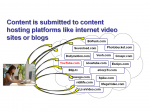
Internet Video Marketing Process Step 2.

As video content aggregators post the video content links start to point back to the website.
Tampa internet marketing strategyInternet Video Marketing Process Step 3.

The net result is that Google “sees” or monitors the increased “relevant” content as well as the increases consumer click-thoughs to the content on the business website.

Tampa internet marketing strategies

It is very important to note that the content needs to be relevant and valuable to consumers in order for this marketing process to work. It is not a scam or a gimmick, but a legitimate benefit to consumers in the form of educational video content.

Custom Eucation Website SEO Theme

Custom Eucation Website SEO Theme

Your institution has a great deal of information to convey in a short period of time. This custom Education Format SEO website theme can professionally display and promote you using text, audio, video, curricula, and more…  Help students, faculty and press find what they need fast, without the homework.
View More Theme Pages

Video Discussion Google+ Update: Real-time Search & Improved Hashtag Support

This week Google built real-time search results into Google+ to give users the ability to watch live feeds of Google+ activity about a given subject.

Google also integrated real-time search with hashtags, popularized like Twitter in order to flag themes.  Your can watch Google’s Gundotra video explaining the features in this via a YouTube video


Google Applies “clustering” and Titles To Video Results

Google is now featuring video listings from its universal search results pages in a 2-column, 2×2 format, similar to its format for featuring 2-columns of links of popular websites….

A recent check of today’s Google Trends shows that the search engine is creating random video cluster listings within some of its universal page listings. Case in point: The most popular keyword group being for recently deceased Carnegie Professor Randy Pausch, author of the inspiring book (and community video series which spawned from it) – The Last Lecture.

6 of the top 10 terms related to Professor Pauch occupy the top keyword searches for today, July 25, 2008. I conducted a test of all 6 searches to see how video listings would be displayed on each queried, universal results page. Here is what I uncovered:

  • #2: randy pausch – Title listing, “Video results for randy pausch” with 4 videos right below, in 2-column format
  • #4: last lecture (the title of his best selling book) – 4 videos all together and at very top of the page, in single-column format
  • #5: really achieving your childhood dreams (the theme of Randy Paunsch’s books and lectures) – 4 videos all together and at the very top of the search listings, in single-column format
  • #8: randy pausch last lecture – 2 videos together at the very top of the page, 2 more videos together, slightly further down – both in single-column format

There were other cases outside of the Top 100 Google Trends keywords where I was able to find more video clustering and sectional title tags in universal results pages. (Guitar Hero is still a heavily popular one.) This new development even available all the way down to hyper-local results as I discovered in the cases of all my own videos I uploaded for local politicians to my own area, both with a municipal mayor and his biggest political opponent.

It appears for now that achieving a titled, 2-column clustered listing (which would seem to make good use of screen real estate and relevancy), does not have a particular rhyme or reason as to what gets selected to be displayed as such. However, there’s no question as to the increased viewer attention that achievin. This should encourage SEOs and other online marketers to see additional benefits for optimizing, testing and sumbmitting not just individual videos, but video groups, to Google’s indexed search properties – YouTube, Google Video, Metacafe, Break, etc.

Source: Google Applies “clustering” and Titles To Video Results http://www.reelseo.com/google-video-results/#ixzz1XJy67gzH
©2008-2011 ReelSEO Video Marketing

Yahoo rolls out enhanced search function

Sunnyvale, Calif.—Yahoo has rolled out an enhanced image search function that offers a new tiled look, a feature that returns latest entries and social inter connectivity.

Yahoo’s “Latest” tab automatically appears for image search results of topics such as images of events and news. A “Galleries” tab will appear for image search results that include photo galleries from Flickr, OMG and Yahoo News.

Also a “Facebook” tab automatically appears if search results include matches from the user’s Facebook friends’ names, photo album names or album descriptions, according to the company.

How to Play a YouTube video on a WordPress Web Page Using Embed Code

This is a short description and demonstration of how to embed a YouTube video on a WordPress web page using embed code.


Step 1. Locate the video on line or copy the URL provided to you.

Step 2. If you have a URL Address, paste it into your browser and touch enter or click go .

Step 3. Click on the share button at the bottom of the video.

Step 4. Click on the Embed button, select the size video you want to play and copy the “embed” code..

Step 5. Open the program you want to play the video in. In the case we will demonstrate a WordPress page…

Step 6. Open the page you want the video to to play .  Note: Make Sure to switch to HTML mode in the page editor. Paste the embed code….

Step 7. Test the page to make sure it plays properly…

All Done…

Local Businesses Find Social Media as Most Effective Marketing Channel- Small Business News

Local Businesses Find Social Media as Most Effective Marketing Channel – Small Business News 

Social media even beats out paid search.  Even though small businesses have found social media to be effective, one of the early setbacks with it was time. Social media is all about relationships, which can take a lot of time. This was difficult for businesses to grasp since they were used to speedy and scalable results from paid search.

However, a study just released from Roost, a social marketing platform for small businesses, found that more than 71.4 percent of small businesses surveyed believe social media is more effective than paid search. Interestingly, only 15 percent of those surveyed found paid search as their most effective means of marketing.

What’s even more interesting is that 84.1 percent of local businesses found Facebook, specifically, to be the most effective channel. LinkedIn was second with 8.3 percent followed by Twitter with 7.6 percent. 
 
The survey also revealed that only 0.5 percent of the respondents did not find marketing with social media to be effective at all.

While we know that economic issues helped to spur the popularity of social marketing, the survey further proved this theory since 46.1 percent of respondents said they use social media because it “saves me money.” The next most popular reason for using social media for marketing was that “it’s a fun way to interact with people,” with 45 percent checking this option. A very close third reason, with 44.8 percent of the votes, said social media “keeps me top of mind” with consumers.

The biggest problem that businesses had with social media was measuring it, with 45.1 percent saying it was their greatest challenge. Not knowing what content to push out through social media was also a challenge for small businesses, getting 38.5 percent of the votes.

So, how does this survey impact you? The biggest takeaway is that you need to be involved in social media, if you’re not already. It’s valuable, and it’s not going away. The channels might change, but consumers are now accustomed to being in control over brands.

Like the study indicated, social media takes time and has its challenges, but it’s very effective if you do it right. Are you tapping this market of opportunity?

July 03, 2011 http://www.SmallBusinessNewz.com Abby Johnson | Staff Writer

How Much Text Content Does Google Recommend on Home Pages?

How Much Text Content Does Google Recommend on Home Pages?
Google recommends having content on the home page along with captions for images for Googlebot to find,. But Google does not recommend having too much content on the home page, such as several mega bytes. Too much content would make it hard for users on slow access and also be a lot for the GoogleBot to crawl.

You can view the full video response on this Google Internet marketing SEO question here:

Does Google Penalize Combining Text and Video Content?

Recently the question came up on how Google views  serving (creating and submitting) a word-for-word text transcript in place of a video and is it considered a negative form of cloaking which could result in a penalty?

In short Google does not consider combining video with a text transcript a problem as long as it is consistent, and it may be a good consumer benefit. You can view the Google video response here for more information on this subject.

Powered by WishList Member - Membership Site Software